

In order for our service to grow your search engine traffic, we will need access to key systems. Easy to follow instructions are below. If you have any issues, please email [email protected] and we can arrange a screen share session. Thank you in advance!

Google Business Profile (GBP)
The objective is to share Owner-level access to your Google Business Profile (GBP) with [email protected]. Here’s how to do that:
- Go to https://business.google.com
- Tap the Sign In button in the upper right corner and enter the email and password you use to access your account or select the account that manages your profile. You should now be signed into the Google Business Profile Manager.
- Click the nine dots to the left of your profile image (upper right of the page) and select “Business Profile.”
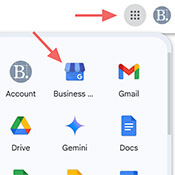
Step 3: Click the nine dots to the left of your profile image (upper right of the page) and select “Business Profile.”
- If you have multiple locations, you will see a list of businesses similar to the one below. Select the location listing that you wish to share access to. If you have only one location, you will be automatically redirected to the Google search page.
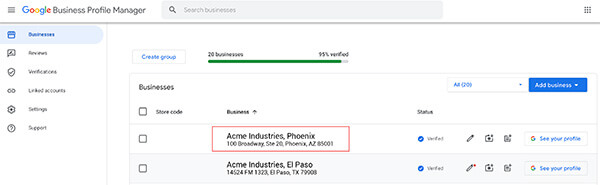
Step 4: if you have multiple locations, select the proper one. If you only have one location, you will automatically be redirected to to the search page.
- Once you have the location in question showing on the Google search page, tap the three vertical dots to the right of the “Your business on Google” header, then select “Business Profile settings.”
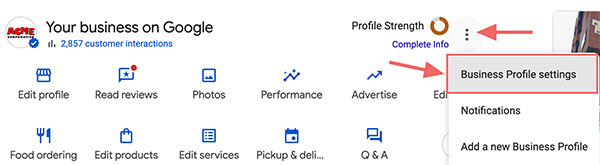
Step 5: tap the three vertical dots to the right of the “Your business on Google” header, then select “Business Profile settings.”
- Select “People and access.” A dialogue will appear.
- Tap the “Add” button.
- Enter [email protected] and select the email when it appears beneath the input field.
- IMPORTANT: Select the role of Owner under the “Access” header (Manager rights will not work).
- Tap the “Invite” button at the bottom of the dialogue.
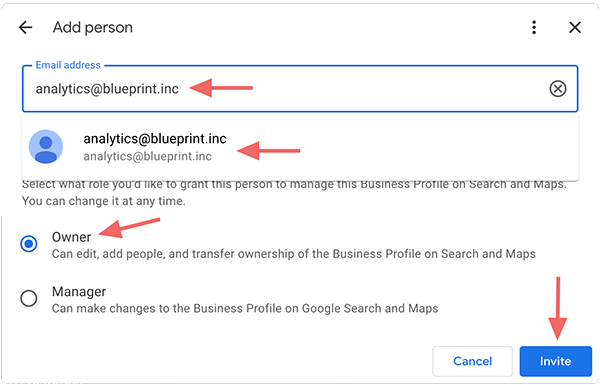
Steps 8, 9, and 10
- Please email us at [email protected] once you send the invite.